You receive an email alert stating that your password was leaked in a data breach. When you look closer, you realize the alert is for an old, forgotten online shopping account or a discussion forum you have not logged into since 2018. Your immediate instinct might be to ignore the warning. After all, there is no active payment card saved on that defunct platform, and you do not care about the account itself.
Ignoring this notification is a dangerous mistake. Even if the compromised account has zero value to you, you must take action immediately. The real danger of a data breach is not what criminals can do inside that single, abandoned account. The threat lies in what automated hacking tools will do with your leaked email and password combination across the rest of the internet.
Credential Stuffing Explained: Why Old Accounts Matter
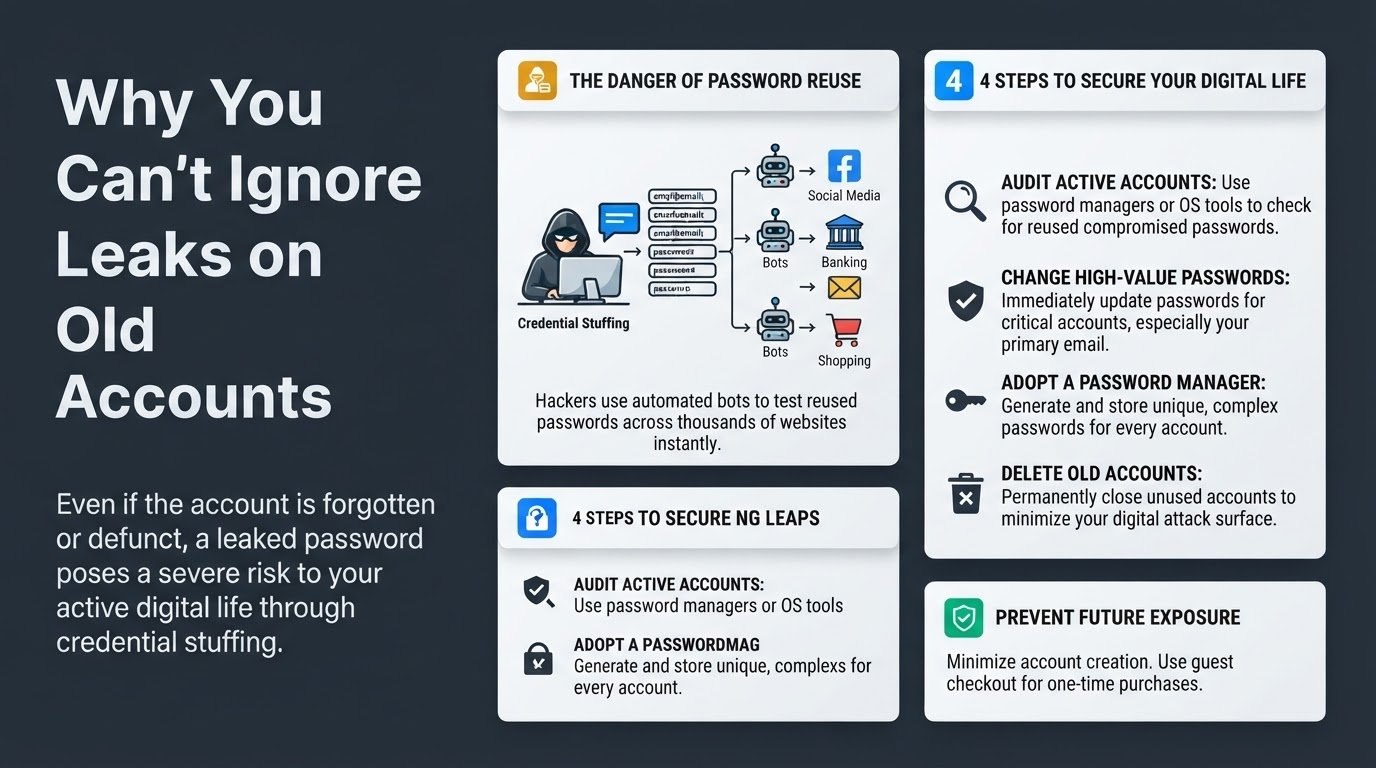
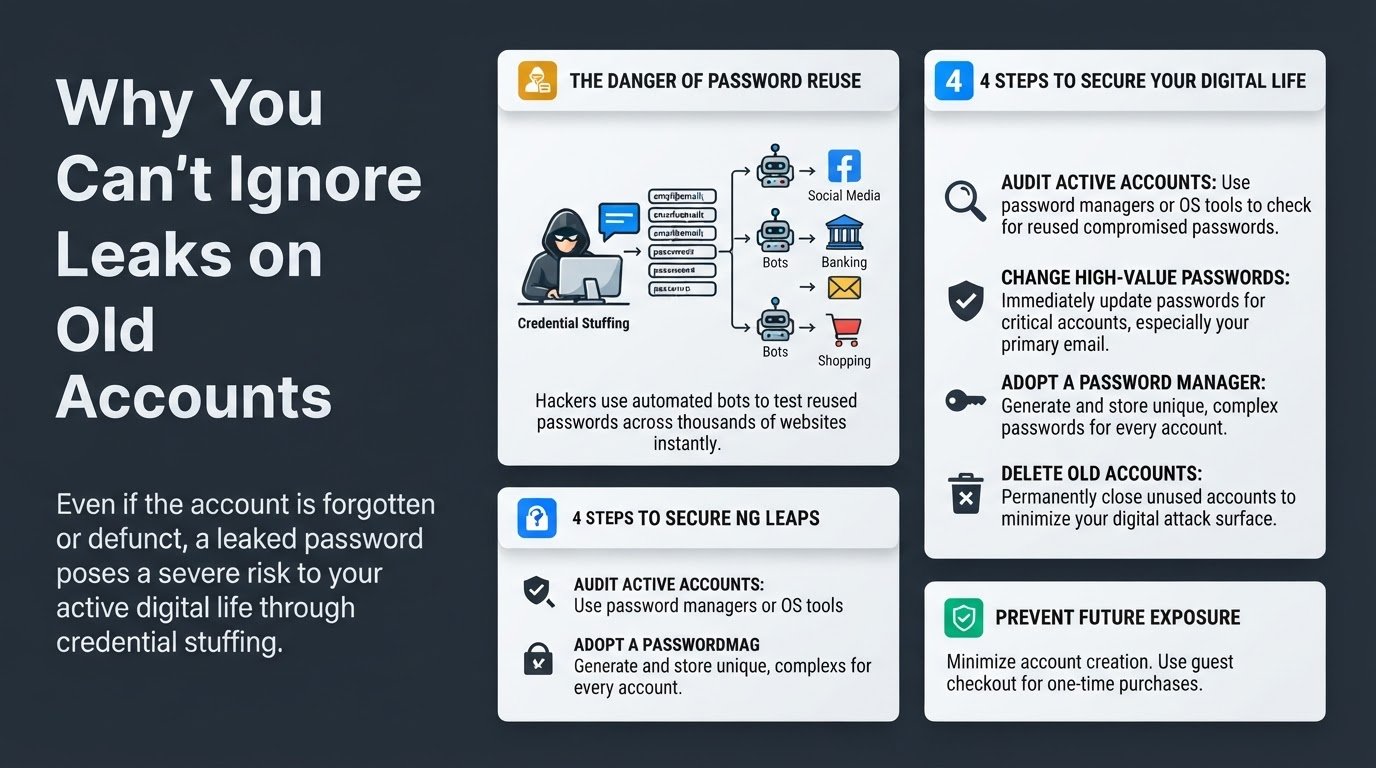
When a database is breached, hackers do not just log into the compromised website to look around. Instead, they compile the leaked usernames, emails, and passwords into massive lists. They then feed these lists into automated software bots that systematically attempt to log into thousands of other popular websites. This automated attack method is known as credential stuffing.
According to technical definitions from Fortinet, credential stuffing relies entirely on the common human habit of password reuse. Cybercriminals know that many users use the same password for their social media, online banking, streaming services, and primary email accounts. If you reused the password from your old, breached account on even one active service, those active accounts are instantly vulnerable to takeover.
A single leak on an obscure website can easily grant a hacker access to your financial portals, personal identity files, or work systems. This is why you must address the leak immediately, even if the source of the breach is a platform you have not used in a decade.
4 Steps to Secure Your Digital Life After a Leak
Do not panic if you discover an old account was breached. Follow these four straightforward steps to isolate the damage and secure your active accounts.
1. Check if you reused the leaked password on active accounts
Your first priority is to identify where else that compromised password might be living. Do not rely on your memory to recall every website you have registered with over the last several years. Instead, use built-in, secure password auditing tools.
If you use an iPhone, iPad, or Mac, go to your system Settings, select Passwords, and look at the Security Recommendations section. Apple automatically flags passwords that have appeared in known data leaks. If you use an Android device or the Google Chrome browser, you can access the Google Password Manager and run a Password Checkup. These tools securely compare your saved credentials against databases of exposed passwords without revealing your actual passwords to third parties.
2. Change the password on those active accounts immediately
If your audit reveals that you reused the leaked password on any active account, log into those services and change your credentials immediately.
You must prioritize high-value accounts. Your primary email address is the most critical account to secure because it acts as the gateway to your entire digital identity. If a hacker gains access to your email, they can request password reset links for your bank accounts, utility bills, and social media profiles. According to Google Support guidelines, securing your recovery email and primary account is the absolute foundation of recovery.
If you begin receiving unexpected security notifications or login requests during this process, your credentials are actively being tested. You can read our detailed guide on what to do if you receive an unsolicited 2FA verification code to protect your active sessions.
3. Start using a password manager to generate unique passwords
The only permanent cure for credential stuffing is to ensure that every single one of your online accounts has a completely unique password. Because remembering dozens of complex passwords is humanly impossible, you should transition to a dedicated password manager.
Modern password managers generate long, random strings of characters, store them securely in an encrypted vault, and automatically fill them in when you visit a website or open an app. This practice ensures that if a company you do business with suffers a data breach in the future, the leaked password will only work on that specific website. The breach remains completely isolated, and none of your other accounts are put at risk. For more details on how online leaks impact your personal devices, explore our guide on what to do if your email is leaked in a data breach.
4. Delete the old, breached account entirely
Once you have secured your active accounts, return to the source of the trouble. If the breached service is one you no longer use, the safest path forward is to delete the account entirely. Leaving unused accounts active creates an unnecessary security footprint, giving companies permission to store your personal data indefinitely.
Log into the old service. If you cannot log in because the password was changed during the breach, use the platform's account recovery or "forgot password" flow to regain access. Once you are logged in, navigate to the account settings, privacy settings, or profile menu to find the option to permanently close or delete your account. According to data privacy recommendations from Cloaked, purging old accounts is one of the most effective ways to shrink your digital attack surface and protect your identity from future corporate data leaks.
To prevent future exposure, make it a habit to decline creating new accounts for one-time transactions. Many online stores allow you to check out as a guest, which prevents your login credentials from being stored in yet another database that could eventually be targeted by hackers.