You have a dead smartphone sitting in your desk drawer, completely unresponsive to the charger. The screen is black, the buttons do nothing, and the device appears entirely lifeless. You want to clear out your clutter and recycle the device, but you are hesitant because you cannot turn the phone on to perform a factory reset. You are left wondering if your personal photos, banking details, and private messages are still sitting on that broken piece of hardware, waiting for someone to extract them.
The direct answer is simple: yes, your data is still fully intact on the internal storage chip, and it is not safe to simply throw a dead phone into a standard, unmonitored e-waste recycling bin. Even if your phone cannot power on because of a dead battery, a broken screen, or a fried charging port, the physical storage chip inside the device remains undamaged. Anyone with specialized hardware, forensic tools, or basic repair skills can potentially extract your data.
To safely dispose of your broken phone and protect your privacy, you must take specific steps to ensure your storage chip is either wiped or physically destroyed before the device leaves your hands.
Why a "Dead" Phone Still Holds Your Private Data
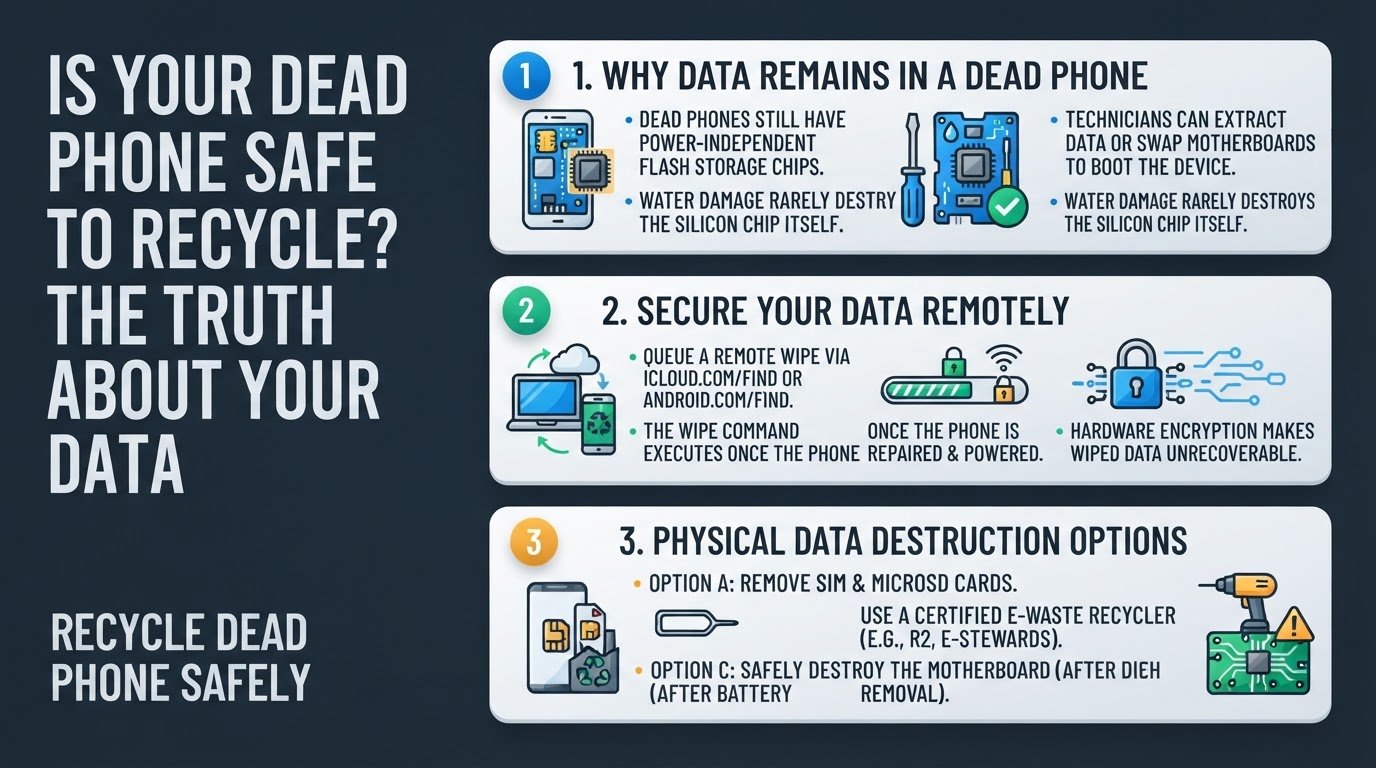
Many smartphone users assume that if a phone does not turn on, the data inside is permanently gone. This is a dangerous myth. The internal storage of a modern smartphone relies on a flash memory chip, typically an eMMC (embedded MultiMediaCard) or UFS (Universal Flash Storage) chip, soldered directly onto the motherboard.
This silicon chip does not need active battery power to retain your files. It functions exactly like a USB thumb drive. According to repair experts at uBreakiFix, technicians can often desolder this chip and read the data directly using specialized readers, or simply swap the motherboard into a working donor phone of the same model to boot it up.
Furthermore, water damage rarely destroys the silicon storage chip itself. Water might short-circuit the power delivery components on the motherboard, but the actual data sectors on the flash memory chip usually remain fully intact as confirmed by MD Repairs. While modern iPhones and Android devices use hardware-backed encryption, a weak lock screen passcode or unencrypted legacy folders can still leave your files vulnerable if a bad actor manages to bypass the broken power components.
Just as dropping an old computer into an unmonitored retail bin carries risks similar to recycling a laptop with its hard drive intact, leaving a dead phone in a public bin exposes your storage chip to physical theft.
How to Recycle Your Dead Phone Safely
If you want to recycle your dead phone without risking your privacy, follow these four practical steps to secure or destroy your data.
1. Trigger a Remote Wipe
Even if your phone is currently unresponsive, you should queue a remote wipe command through your cloud account. If a recycler or a third party eventually repairs the power delivery system and boots the phone, the device will immediately connect to the internet and execute the wipe command.
- For iPhones: Log into iCloud.com/find or open the Find My app on another Apple device. Select your dead iPhone from the list and choose "Erase This Device."
- For Android Phones: Visit android.com/find, log into your Google account, select the broken device, and click "Erase Device."
This command deletes the encryption keys on the device. While modern devices use hardware-backed encryption, which makes data unrecoverable after a proper wipe as explained in our guide on whether photos are safe after a factory reset, queuing this remote wipe acts as a vital digital tripwire.
2. Remove Physical Storage and SIM Cards
Before handing your phone over to anyone, use a SIM ejector tool or a paperclip to pop open the tray. The Federal Trade Commission (FTC) recommends removing both your SIM card and any expandable microSD card.
While the SIM card holds your carrier profile and phone number, microSD cards often contain unencrypted personal photos, documents, and contacts. If you leave a microSD card inside a dead phone, anyone who slides the tray out can insert the card into a computer and read your files instantly.
3. Use a Certified E-Waste Recycler
If you decide to recycle the phone without physically destroying it yourself, do not use random drop-off boxes at local retail stores. Instead, find a recycler certified by e-Stewards or R2 (Responsible Recycling).
These organizations operate under strict data security standards. Certified recyclers like ERI contractually guarantee the secure destruction of all data. They do this by feeding the devices into industrial shredders that grind the motherboards and storage chips into tiny, unrecoverable fragments.
4. Safely Destroy the Motherboard (The Physical Option)
If you do not have access to a certified recycler and must use a standard local e-waste bin, you should physically destroy the motherboard yourself. This is the only way to guarantee absolute data security according to community discussions on Reddit.
However, you must avoid the most common and dangerous mistake: drilling or hammering directly through an intact phone.
Smartphones contain lithium-ion batteries. If you puncture a lithium-ion battery with a drill bit or a nail, you will cause a thermal runaway reaction. This results in an immediate, highly toxic chemical fire or explosion.
To destroy the motherboard safely:
- Use an online repair guide to open the phone chassis.
- Carefully disconnect and remove the lithium-ion battery. Set it aside for safe local battery disposal.
- Locate the main logic board (the green or black circuit board).
- Use a drill, a heavy hammer, or strong metal shears to crack, puncture, or shred the board, focusing on the square silicon chips. According to data destruction experts, breaking the physical storage chip into multiple pieces makes data recovery impossible.
- Drop the destroyed board into your local e-waste recycling bin.
The Bottom Line on Dead Phone Security
Leaving your old, broken phones in a drawer because you fear data theft is a common habit, but it is unnecessary. As community experts note on Quora, the risk of data recovery from a dead phone is real if the device falls into the hands of a motivated finder. By taking five minutes to remove your physical cards, queue a remote wipe, and either hand the device to a certified shredding service or safely disable the motherboard yourself, you can clear out your clutter with total peace of mind.